

Minvo API and MCP Guide: Edit Video Clips with AI Agents and Code
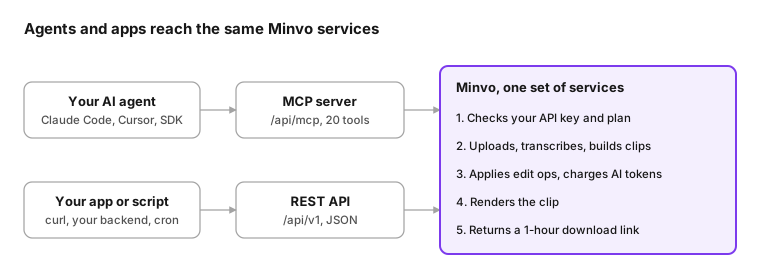
Minvo's API and MCP server let your own tools and AI agents upload videos, turn them into captioned clips and edit those clips with plain-language prompts, without opening Minvo Studio.
How it fits together
MCP and REST are two doors to the same services, as the diagram above shows. An edit made by your agent behaves exactly like the same edit made by your script, costs the same tokens, and shows up in Studio.
Get access
API and MCP access comes with every monthly or annual Pro and Pro+ plan. Lifetime (LTD) Pro and Pro+ accounts unlock it with a one-time $199.99 add-on.
| Plan | API and MCP | Monthly tokens |
|---|---|---|
| Pro, monthly or annual | Included | 500 |
| Pro+, monthly or annual | Included | 1,500 |
| LTD Pro | $199.99 one-time add-on | 500 |
| LTD Pro+ | $199.99 one-time add-on | 1,500 |
| Free, Creator, LTD Creator | Not available | — |
Create an API key
- In Minvo Studio, open Settings → API keys. On an LTD plan, click Unlock API and MCP: $199.99 first.
- Click Create key, give it a name (for example "Claude Code") and choose its scope: read (look only) or write (upload, edit, render).
- Copy the key now. It starts with
mnv_and is shown only once; Minvo stores only a hash of it. - Keep it secret, like a password. An organization has one active key at a time: to replace it (or if it leaks), revoke it on the same page and create a new one. Only organization admins can create or revoke keys.
A key acts only inside your organization and stops working if its creator leaves the organization or deletes their account.
Connect over MCP
Minvo's MCP server is at https://be.minvo.pro/api/mcp (Streamable HTTP). Your agent sends your key in an Authorization: Bearer mnv_… header, and from then on you just ask it for what you want.
Claude Code
claude mcp add --transport http minvo https://be.minvo.pro/api/mcp \
  --header "Authorization: Bearer mnv_YOUR_KEY"
Run /mcp inside Claude Code to check that minvo shows as connected.
Cursor (.cursor/mcp.json in your project, or ~/.cursor/mcp.json for all projects)
{
  "mcpServers": {
    "minvo": {
      "url": "https://be.minvo.pro/api/mcp",
      "headers": { "Authorization": "Bearer mnv_YOUR_KEY" }
    }
  }
}
Your own agent (TypeScript, @modelcontextprotocol/sdk)
import { Client } from "@modelcontextprotocol/sdk/client/index.js"
import { StreamableHTTPClientTransport } from "@modelcontextprotocol/sdk/client/streamableHttp.js"

const transport = new StreamableHTTPClientTransport(new URL("https://be.minvo.pro/api/mcp"), {
  requestInit: { headers: { Authorization: `Bearer ${process.env.MINVO_API_KEY}` } },
})
const client = new Client({ name: "my-agent", version: "1.0.0" })
await client.connect(transport)

const brands = await client.callTool({ name: "list_brands", arguments: {} })
Hosted connectors (claude.ai, ChatGPT) aren't supported yet; use Claude Code, Cursor or your own agent.
The 21 tools your agent gets
| Tool | Access | What it does |
|---|---|---|
list_brands |
read | The brands (shows) you can upload to |
import_video |
write | Import a YouTube or Vimeo link |
create_video_upload |
write | Get an upload target for a local file |
refresh_video_upload |
write | A fresh upload target for a video still awaiting its file |
process_video |
write | Transcribe a video and make clips |
list_videos |
read | A brand's videos, newest first |
get_video_status |
read | One video and where it is in processing |
get_transcript |
read | The transcript as JSON, SRT or plain text |
list_clips |
read | A video's clips |
create_clip |
write | A clip over a time range you choose |
get_clip |
read | A clip's current edits, words, jobs and revision |
edit_clip |
write | Apply edit operations to a clip |
reset_clip |
write | Undo edits, like Studio's Reset moment |
get_edit_options |
read | Every operation, font, layout, language and token price |
get_token_balance |
read | Tokens left this month and from packs |
search_media |
read | Stock images, videos, GIFs, stickers and sound effects |
save_template |
write | Save a clip's style as a brand template |
preview_clip |
write | A quick 360p preview render |
render_clip |
write | A full-quality render (1080p, or 4K on Pro+) |
get_render |
read | Render status and its download link |
get_job |
read | Status of an async job (audio enhancement, dubbing) |
A read-only key can use only the read tools.
Uploading a file from your computer. If your agent can't send files itself, open the uploadHandoffUrl that create_video_upload returns: a Studio page that uploads your file into the video the agent reserved. If an upload broke off or its target expired, refresh_video_upload continues the same video rather than creating a second one.
REST quick start
The REST API lives at https://be.minvo.pro/api/v1, uses camelCase JSON, and has interactive docs at https://be.minvo.pro/api/v1/docs. Every call carries Authorization: Bearer mnv_…. The walk-through below takes one video from link to downloaded clip.
export MINVO=https://be.minvo.pro/api/v1
export KEY="Authorization: Bearer mnv_YOUR_KEY"
1. Check your key and pick a brand.
curl -H "$KEY" $MINVO/me
curl -H "$KEY" $MINVO/brands
# {"brands":[{"id":42,"name":"My Podcast","imageUrl":null}]}
2. Add a video. Import a YouTube or Vimeo link:
curl -X POST -H "$KEY" -H "Content-Type: application/json" \
  -H "Idempotency-Key: import-ep-118" \
  -d '{"brandId":42,"url":"https://www.youtube.com/watch?v=VIDEO_ID"}' \
  $MINVO/videos/import
# {"video":{"id":9001,"status":"uploaded",...},"deduplicated":false}
Or upload a local file in one request (.mp4, .m4v, .mov or .webm; the form fields go before file):
curl -X POST -H "$KEY" \
  -F brandId=42 -F title="Episode 118" -F file=@episode-118.mp4 \
  $MINVO/videos/upload-file
For very large files, POST /videos/uploads returns a resumable (TUS) upload target instead, and POST /videos/{id}/upload gives a fresh one for the same video if it expired or the upload broke off.
3. Process it into clips. auto makes suggested clips for long videos and one full-length captioned clip for videos under 2 minutes. clipDefaults are edits applied to every clip as it's built.
curl -X POST -H "$KEY" -H "Content-Type: application/json" \
  -d '{"mode":"auto","clipDefaults":[
        {"op":"set_aspect_ratio","ratio":"9:16"},
        {"op":"remove_silences","minSilenceMs":700}]}' \
  $MINVO/videos/9001/process
Use "mode":"captions_only" to always get one full-length clip, or "clips" to ask for suggestions.
4. Wait until it's ready, then list the clips. Poll every 15–30 seconds until status is ready, then list clips. Each clip's draftStatus turns ready once its edits are built.
curl -H "$KEY" $MINVO/videos/9001
curl -H "$KEY" $MINVO/videos/9001/clips
5. Edit a clip. Read it first to get its revision, then send operations with that revision:
curl -H "$KEY" $MINVO/clips/555          # "revision": 3

curl -X POST -H "$KEY" -H "Content-Type: application/json" \
  -H "Idempotency-Key: clip555-captions-v1" \
  -d '{"expectedRevision":3,"ops":[
        {"op":"set_captions","textColor":"#FFFF00","y":1500},
        {"op":"magic_emojis","position":"above"}]}' \
  $MINVO/clips/555/edits
All operations in one call apply together or not at all. If someone changed the clip since you read it, you get 409 with the current revision: read again and resend.
6. Render and download. Start a preview (360p) or a full render, poll it, then download:
curl -X POST -H "$KEY" -H "Content-Type: application/json" \
  -d '{"quality":1080}' $MINVO/clips/555/renders
# {"id":31,"status":"queued",...}

curl -H "$KEY" $MINVO/renders/31
# {"status":"complete","downloadUrl":"https://be.minvo.pro/api/v1/renders/31/download?expires=...&signature=..."}

curl -L -o clip-555.mp4 "DOWNLOAD_URL"
The download link needs no key and works for one hour; ask GET /renders/{id} again for a fresh one.
Other useful endpoints
| Method and path | What it does |
|---|---|
GET /videos?brandId=42 |
A brand's videos, newest first (page, pageSize up to 100) |
GET /videos/{id}/transcript?format=srt |
The transcript as json, srt or txt |
POST /videos/{id}/clips |
A custom clip: {"startMs":60000,"endMs":95000} |
POST /clips/{id}/reset |
Undo edits back to the clip's original state, then re-apply the video's defaults |
POST /clips/{id}/previews |
A 360p preview render |
GET /jobs/{id} |
An async job (audio enhancement, dubbing) |
GET /edit-options?brandId=42 |
Everything you can pass to edits: ops, fonts, layouts, music, languages, token prices |
GET /media/search?type=gif&query=wow |
Stock images, videos, GIFs, stickers and sound effects |
GET or POST /brands/{id}/templates |
List templates, or save a clip's style as one: {"clipId":555,"name":"Yellow bold"} |
GET /tokens |
Your token balance |
Edit operations
Every edit Studio offers is an operation (op) you send to POST /clips/{id}/edits or the edit_clip tool, up to 50 per call. Times are in milliseconds on the original video's timeline, colours are #RRGGBB (or #RRGGBBAA), and media is given as {"url":"https://…"}.
| Area | Operations |
|---|---|
| Format and style | set_aspect_ratio (9:16, 1:1, 16:9), apply_template, set_background, set_border, set_footer |
| Captions | set_captions, set_caption_animation, edit_words, set_line_breaks |
| Title | set_title, regenerate_title (AI) |
| Framing and camera | set_framing (contain, center, split), set_camera_layout, set_camera_filter, set_camera_animation, set_main_media |
| Cuts | trim, remove_silences, remove_fillers, remove_repetitions, add_jump_cut, undo_cuts |
| Hooks and energy | super_hook_intro, video_pulse (and their revert_ ops) |
| Overlays | add_overlay (text, emoji, image, video, GIF or sound), update_overlay, remove_overlay |
| Branding | set_logo, set_intro, set_outro |
| Audio | set_background_music, auto_music, set_main_volume, set_audio_track, enhance_audio (async) |
| Language | translate_captions (AI), select_translation, dub (async) |
| AI magic | magic_emphasis, magic_emojis, emoji_for_text, magic_broll, magic_sounds, ai_image |
GET /edit-options (or get_edit_options) lists every op with its allowed values, the fonts, camera layouts, music library and languages, and which ops your plan can use.
Examples
Yellow, bold, upper-case captions near the bottom of a 9:16 clip, with the active word highlighted (pick a bold font name from get_edit_options):
[
  {"op": "set_aspect_ratio", "ratio": "9:16"},
  {"op": "set_captions", "fontFamily": "<a bold font from get_edit_options>", "textColor": "#FFFF00",
   "strokeWidth": 4, "strokeColor": "#000000", "textCase": "uppercase", "y": 1500, "lines": 2},
  {"op": "set_caption_animation", "wordAnimation": "biggerFontWhenActive", "activeTextColor": "#FFFFFF"}
]
Tighten the pacing:
[
  {"op": "remove_silences", "minSilenceMs": 500},
  {"op": "remove_fillers"},
  {"op": "super_hook_intro", "zoomType": "short", "soundEffect": "swoosh_hit"}
]
Split-screen for an interview section, picture-in-picture elsewhere:
[
  {"op": "set_camera_layout", "startMs": 12500, "endMs": 17500, "camera": {"layout": "split"}},
  {"op": "set_camera_layout", "startMs": 17500, "endMs": 20000,
   "camera": {"layout": "PiP", "pipPosition": "bottomRight"}}
]
Branding, a text callout and music:
[
  {"op": "set_logo", "slot": 1, "media": {"url": "https://example.com/logo.png"}, "x": 820, "y": 80, "zoom": 0.5},
  {"op": "add_overlay", "startMs": 3000, "endMs": 6000,
   "content": {"type": "text", "text": "Link in bio", "textColor": "#FFFFFF", "backgroundColor": "#7C3AED"}},
  {"op": "auto_music", "genre": "upbeat"},
  {"op": "set_outro", "key": "ContinueOnYouTube"}
]
AI edits (these use tokens):
[
  {"op": "magic_emphasis"},
  {"op": "magic_emojis", "position": "above"},
  {"op": "magic_broll", "format": "gif", "position": "above"},
  {"op": "regenerate_title", "style": "question"},
  {"op": "translate_captions", "language": "de-DE"}
]
Rules worth knowing
- Plans:
ai_image,magic_brollwithai_img,duband 4K renders need Pro+.enhance_audioneeds the studio-audio feature. - AI limit: at most 5 AI operations per call.
- Async ops:
enhance_audioanddubstart a job and the call returns202. Follow it withGET /jobs/{id}orget_job. If you change the audio track while it runs, the result is kept but not selected (applied: false); pick it later withset_audio_track. trim: it changes the clip's range and resets its translations, dubs and enhanced audio.- AI framing:
set_framingwith"mode":"ai"currently returns422 framing_unavailable; usecenter,containorsplit. - Media: media by uploaded asset (
assetId) and named caption or title presets aren't available yet (501). Pass a mediaurland explicit style fields instead.
Prompt examples
With the MCP server connected, you talk to your agent in plain language. It reads the clip (get_clip) and the options (get_edit_options), picks the operations and applies them with edit_clip. Being specific about colours, positions and times gets you closer on the first try.
From a link to finished clips
Import https://www.youtube.com/watch?v=VIDEO_ID into my "My Podcast" brand, process it into clips, and when they're ready list the five clips with the strongest hooks.
Tools: list_brands → import_video → process_video → get_video_status (polled) → list_clips.
Process video 9001 so every clip is 9:16 with silences removed and yellow captions.
Tools: process_video with clipDefaults: set_aspect_ratio, remove_silences, set_captions.
Style and captions
| Prompt | What the agent sends |
|---|---|
| "Make clip 555 vertical with yellow bold captions at the bottom." | set_aspect_ratio 9:16, set_captions with a bold font from the options, textColor #FFFF00, y near the bottom |
| "Captions in upper case, two lines max, and make the spoken word pop." | set_captions textCase uppercase, lines 2; set_caption_animation wordAnimation biggerFontWhenActive |
| "Highlight the important words in our brand purple." | magic_emphasis with colors ["#7C3AED"] (1 token) |
| "Fix the caption at 0:42: it should say 'Kubernetes', not 'Cuban eighties'." | edit_words over that time range |
| "Apply my 'Yellow bold' template." | apply_template with the template's id |
Pacing and structure
| Prompt | What the agent sends |
|---|---|
| "Remove silences and filler words." | remove_silences, remove_fillers |
| "Cut it down to 0:10–0:55 of the video." | trim startMs 10000, endMs 55000 |
| "Open with a hook: quick zoom and a swoosh." | super_hook_intro zoomType short, soundEffect swoosh_hit |
| "Add some energy, punch-in on short sentences." | video_pulse frequency shortSentences, intensity energetic |
Layout and framing
| Prompt | What the agent sends |
|---|---|
| "Split layout for the interview part, picture-in-picture for the rest." | Several set_camera_layout ops with split and PiP over the matching time ranges |
| "Keep both speakers in frame." | set_framing split |
| "Show the whole frame with a blurred background." | set_framing contain, set_background videoBlur |
Overlays, B-roll and branding
| Prompt | What the agent sends |
|---|---|
| "Add emojis and B-roll." | magic_emojis, magic_broll (1 token each) |
| "Put a 'mind blown' GIF over the moment he says 'wow'." | get_clip to find the word's time, search_media gif, then add_overlay with that GIF |
| "Add my logo top-right: https://example.com/logo.png" | set_logo slot 1, that media url, x, y, zoom |
| "Show 'Link in bio' for the last 3 seconds." | add_overlay with text content over the clip's last 3 s |
| "Generate an image of a rocket launching for 0:05–0:08." | ai_image with that prompt and range (Pro+, 8 tokens) |
| "Add upbeat background music, quiet." | auto_music upbeat, then set_background_music volume 20 |
| "End with the 'Continue on YouTube' outro." | set_outro key ContinueOnYouTube |

Language and audio
| Prompt | What the agent sends |
|---|---|
| "Translate the captions to German and dub it." | translate_captions de-DE (4 tokens a minute), dub de-DE (async; the agent follows it with get_job) |
| "Clean up the audio, it's noisy." | enhance_audio (async, 1 token a minute) |
| "Switch back to the original audio." | set_audio_track original |
| "Give it a catchier title, as a question." | regenerate_title style question |
Finishing
Render a quick preview of clip 555, and if it looks fine render it in 1080p and give me the download link.
Tools: preview_clip → get_render (polled) → render_clip → get_render → the downloadUrl.
Save clip 555's style as a template called "Yellow bold" and apply it to every other clip from this video.
Tools: save_template → list_clips → edit_clip with apply_template for each clip.
How many tokens do I have left, and what would adding emojis and B-roll to all 8 clips cost?
Tools: get_token_balance and get_edit_options (token prices). The answer: 2 tokens per clip, 16 in total.
Tips for better results
- Name the clip: say which clip you mean (by number, title or "the one about pricing"); the agent can find it with
list_clips. - Use the timeline: give times as they appear in the video ("at 2:15"). Agents convert them to milliseconds.
- Ask for a preview first: a 360p preview is quick and doesn't count against your exports.
- Batch related changes: one prompt with several changes becomes one
edit_clipcall that applies all or nothing.
Tokens
AI and heavy-compute edits made through the API or MCP spend tokens. Everything else is free: uploads, transcription, clips, normal edits, renders and dubbing. Studio is never charged tokens.
| Operation | Tokens |
|---|---|
ai_image (AI-generated image) |
8 per image |
magic_broll with AI images |
8 per image |
translate_captions |
4 per started clip minute |
enhance_audio |
1 per started clip minute |
set_framing with ai |
1 per started clip minute, once AI framing is available |
magic_broll (GIF, stock image or video search) |
1 |
magic_emphasis, magic_emojis, emoji_for_text, magic_sounds, regenerate_title |
1 each |
A started minute is rounded up: a 61-second clip counts as 2 minutes.
Where tokens come from
- Monthly tokens: 500 on Pro and 1,500 on Pro+ (LTD included). They reset on the 1st of each month, 00:00 UTC, and don't roll over.
- Token packs: $10 for 1,000 tokens or $20 for 3,000 tokens, from Settings → API keys → Buy tokens. Pack tokens never expire.
- Monthly tokens are spent first, then pack tokens.
How charging works
- An edit that needs tokens reserves them before it runs. If you don't have enough, it's refused with
402 tokens_exhaustedand nothing runs. - Instant AI edits are charged when the edit saves. Async jobs (audio enhancement, AI framing) are charged only if the job succeeds; a failed or cancelled job gives its tokens back.
- A charge always uses the price at the moment you sent the request.
Check your balance with GET /api/v1/tokens or the MCP tool get_token_balance. The edit options (get_edit_options) list each operation's current price, so an agent can tell you the cost before it spends.
Errors, limits and retries
Every error has the same body; switch on code, not on the message. Over MCP, the tool result carries the same body with isError: true.
{"statusCode": 402, "error": "Payment Required", "code": "tokens_exhausted",
 "message": "...", "details": {"cost": 8, "monthlyLeft": 0, "purchasedLeft": 3, "monthlyResetsOn": "2026-11-01T00:00:00.000Z"}}
| Status | code |
What to do |
|---|---|---|
| 401 | missing_api_key, invalid_api_key |
Send Authorization: Bearer mnv_…; create a new key if it was revoked |
| 402 | plan_required |
Upgrade, or unlock the add-on on an LTD plan; also returned for Pro+-only ops |
| 402 | tokens_exhausted |
Buy a token pack or wait for the monthly reset (details shows the cost and what's left) |
| 403 | insufficient_scope |
The key is read-only; use a write key |
| 404 | not_found |
The id doesn't exist or isn't in your organization |
| 409 | conflict |
The clip changed: GET it again and resend with details.revision. Also returned while a video is still uploading or already processing |
| 409 | job_in_progress |
That clip already has the same async job running; wait for it |
| 413 / 415 | payload_too_large, unsupported_media_type |
File over your plan's size limit, or not .mp4, .m4v, .mov or .webm |
| 422 | validation_error |
A field is wrong; details lists each problem |
| 422 | idempotency_mismatch |
You reused an Idempotency-Key with a different request |
| 422 | framing_unavailable, op_unavailable |
That operation isn't available right now |
| 429 | rate_limited |
Too many calls this minute; wait for Retry-After seconds |
| 429 | concurrency_limit |
Your organization already has the maximum jobs running; retry when one finishes |
| 501 | not_implemented |
Not available yet (uploaded-asset media, named presets) |
Limits
| Limit | Value |
|---|---|
| Reads per key | 60 per minute |
| Writes per key | 20 per minute (each AI op counts as one more) |
| MCP requests per key | 120 per minute |
| Videos processing at once, per organization | 3 |
| Renders and previews at once, per organization | 5 |
| File uploads at once, per organization | 3 |
| Operations per edit call | 50, of which at most 5 AI |
| Download link lifetime | 1 hour |
Retry safely with Idempotency-Key
Networks drop requests. Send an Idempotency-Key header (any unique string up to 128 characters, for example a UUID) on imports, uploads and edits; MCP tools take it as idempotencyKey.
- Same key, same request: you get the first answer back, and nothing runs or is charged twice. Edit keys are kept for 24 hours.
- Same key, different request:
422 idempotency_mismatch. - First request still running:
409. Wait a moment and retry. - First request failed: nothing was kept, so retrying with the same key runs it again.
Use a new key for each new change, and the same key only for retries of that change.